
THE FULL INVENTORY
Everything in Mathiter, and the state each part is actually in.
Not the pitch — the list. Every row below carries one of three labels, and they are set in the same type: it works in English, it is built and the screen is Korean today, or it does not exist. If you are deciding whether to put this in front of a class, the third label is the one worth reading.
30 things are listed below. 19 of them work in English today, 5 are built and sit on a Korean screen, and 6 do not exist. A further 8 absences have a table of their own near the bottom, because the list of what a tool cannot do is the part of a feature page that is usually missing.
The three labels
- In English
- Built, and a student or teacher uses it in English today.
- Korean interface
- Built and working. The interface is Korean until the English build lands.
- Not built
- Does not exist. Listed here rather than left out.
MEASURING
Finding out where a student actually is
The free part, and the part a department is most likely to use first.
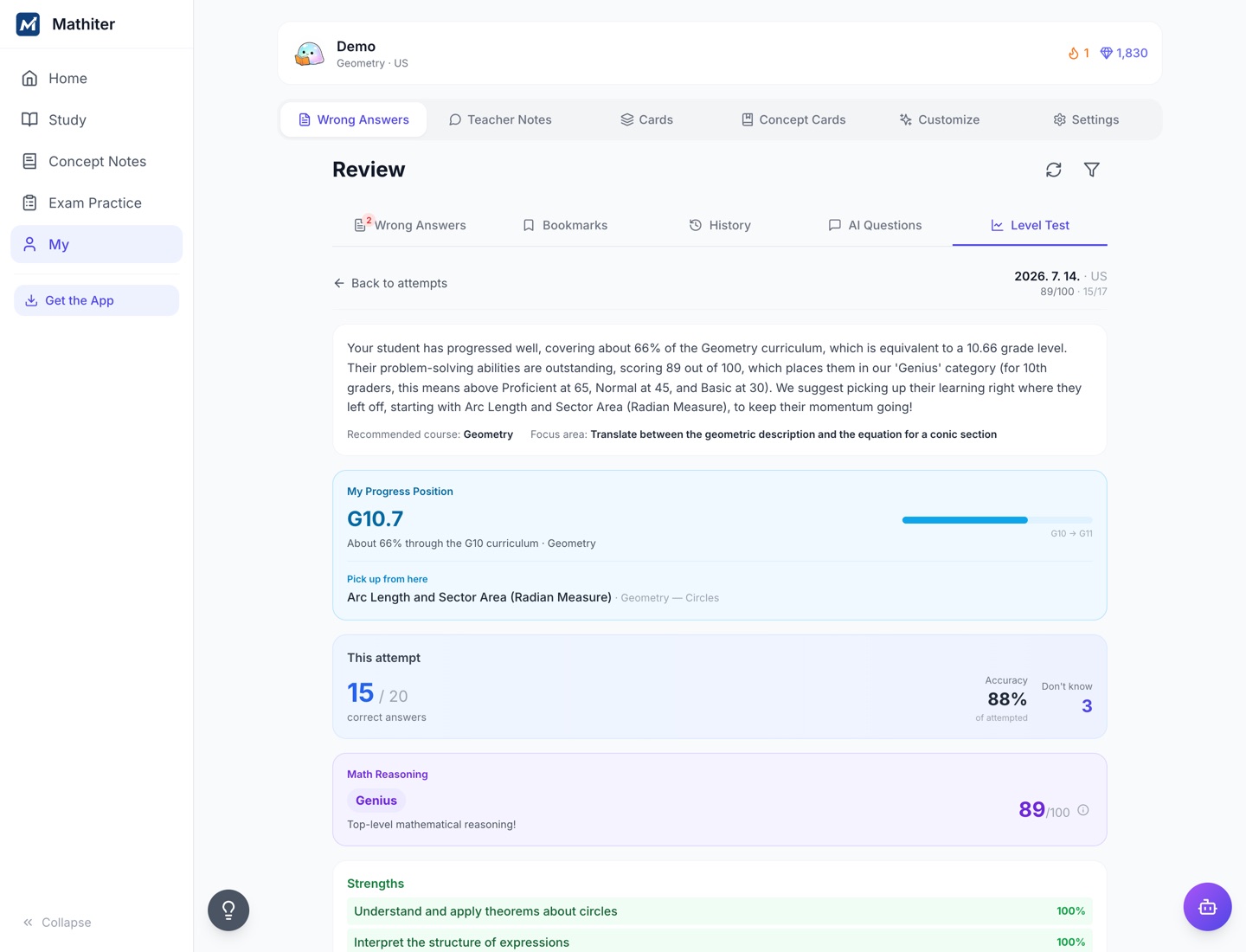
Adaptive placement test
In EnglishFive to thirty questions, each chosen from the answers before it. It stops when the estimate is precise enough rather than when a question count runs out, so a student who is consistent finishes early. Free, uncapped, and it stays free — a student can sit it again next term without anything changing on your side.
An ability estimate with a confidence range
In EnglishA two-parameter IRT model, estimated expected-a-posteriori over 61 quadrature points, stopping at a standard error of 0.35 or 0.45 depending on the run. What comes back is an ability figure, the range it is confident within, and a percentile. Not a grade equivalent, and not a score out of anything.
A roadmap through the standard tree
In EnglishThe student's track laid out as it is actually taught, marking what is finished, what is in progress and what comes next.
A projected Digital SAT score
In EnglishPlacement and practice data are analysed into a projected Digital SAT score. That is the only exam that returns one. Six others have a configured profile in the code and none of them produces a number — a request for any of them fails rather than guessing, which is the behaviour you want but not what a feature table would have told you.
Any item below Grade 5
Not builtThe pool has no questions below Grade 5, so the test cannot place a primary student. What it would return for one is a floor, not a measurement — so it is not offered.
Calibration on your own cohort
Not builtItem difficulty is calibrated across the whole population. There is no per-school, per-class or per-cohort scope anywhere in the calibrator. Your students' answers improve the pool for everyone using it, including schools that are not you, and the estimate your students get is not sharpened by being yours.
TEACHING MATERIAL
What a student can be sent away to read
Counted as English lecture scripts against leaf standards — the ones you actually teach, not chapters and not “aligned to”.
665 lectures across 19 tracks
In EnglishEach with an English script and audio narration. Every one of the 558 leaf standards in the US ladder from Grade 5 through AP Calculus BC has a lecture behind it. The IB, IGCSE and Cambridge tracks have the full standard tree and the question bank but thin lecture coverage, and the matrix prints every row including the ones that read zero.
Term lookup inside the lecture
In EnglishTap a term and it separates the everyday meaning of the word from what it means in mathematics. This is aimed at the strong mathematician sitting an English-medium exam in a second language, where the maths is not the obstacle and the sentence is — and it is the reason this feature belongs on an English site rather than a Korean one.
Concept notes across six strands
In EnglishNumber, algebra, geometry, functions, statistics and calculus, readable from any grade rather than gated to the student's own — so a Year 10 student can look up a Year 12 definition without asking anyone.
Lessons you write or edit
Not builtA teacher cannot add a lecture, edit ours, or change the order they appear in. What is in the library is what there is.
PRACTICE
What happens after a wrong answer
The part of the product the rest of this site is an argument about.
An authored Socratic chain on every wrong option
In EnglishEvery wrong option in every question was written on purpose, and carries the name of the misconception that produces it, the student reasoning behind it, and an ordered chain of steps that walks back out — with a hint at each step and the correct answer withheld to the end. None of it is generated when the student clicks. It was written beforehand and stored, which is why the same wrong option teaches the same thing every time, and why you can read the teaching before a student ever meets it.
Misconception cards
In EnglishA wrong idea a student has met becomes a card that can be put in front of them again, sorted into ten kinds — among them sign errors, order of operations, misreading the question, skipped steps, units, and confused variables. Each card records how often it has come back and whether it has been overcome.
Four practice modes
In EnglishBy topic, weakness-first, mixed, and timed.
A wrong-answer notebook that fills itself
In EnglishWrong answers collect for re-solving without anyone tagging them, alongside bookmarked questions and the full attempt history.
EXAM PRACTICE
Papers a student can sit
One exam is released as a full instrument. The honest version of that sentence is below it.
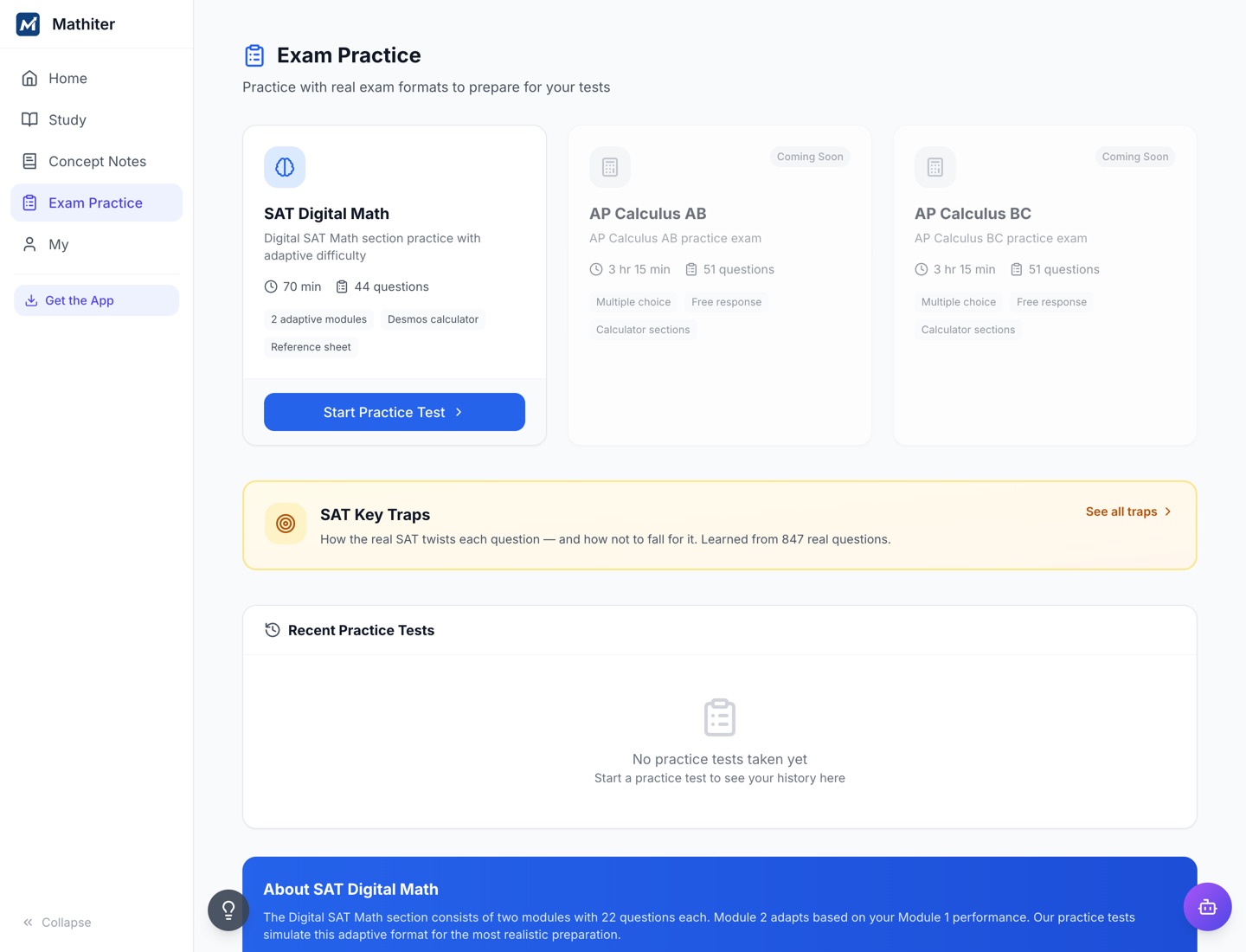
The Digital SAT, as the whole instrument
In EnglishTwo adaptive modules in the real shape — 44 questions in 70 minutes, with the on-screen calculator and the reference sheet where the student expects them. The second module's difficulty depends on the first, as it does on the day.
A score report by domain and by difficulty
In EnglishWhere the marks went, broken out by content domain and by question difficulty, and a breakdown by the kind of trap a student fell for. Read on screen.
AP Calculus AB and BC papers
Not builtBoth appear in the app marked as coming, and neither is released. There is no date. Everything else on the AP side is teaching material and question practice, which is a different thing from a paper to sit, and this site will not blur the two.
A report you can print or export
Not builtThere is no PDF export and no print-ready document anywhere in the product. A browser's print dialogue is not a feature and we are not going to call it one.
THE AI TUTOR
The one place a student chooses what leaves the product
It is genuinely useful and it is the feature with the most to disclose, so it gets its own section rather than a row.
Ask a maths question, or photograph one
In EnglishA student types a question, pastes or uploads an image up to 5 MB, or attaches a PDF up to 10 MB, and gets a worked explanation back. Ten a day on a free account, a hundred on a paid one. The questions and answers stay in the student's review history.
A teacher-side view of it
Not builtThe history belongs to the student's account. A teacher has no view of what a student asked, so this is not a channel you can supervise.
Where that content goes, before you put it in front of a class
The typed question, the image and the text pulled out of the PDF are all sent to Google Gemini. The service answers mathematics only — but that judgement is made by the model, so the content has already been sent by the time anything is rejected. In practice a student can put whatever they photograph in front of a third-party model, and nothing on our side prevents it beforehand.
The typed question and the answer are stored against the account. The image is not — it goes with the request and is never written to our database. There is no setting that turns the AI Tutor off, for a school or for a student. If that is a blocker for your data officer, it is better that it blocks now.
WHY STUDENTS COME BACK
The part that decides whether any of the above gets used
A tool a student avoids has no coverage, however complete the matrix is.
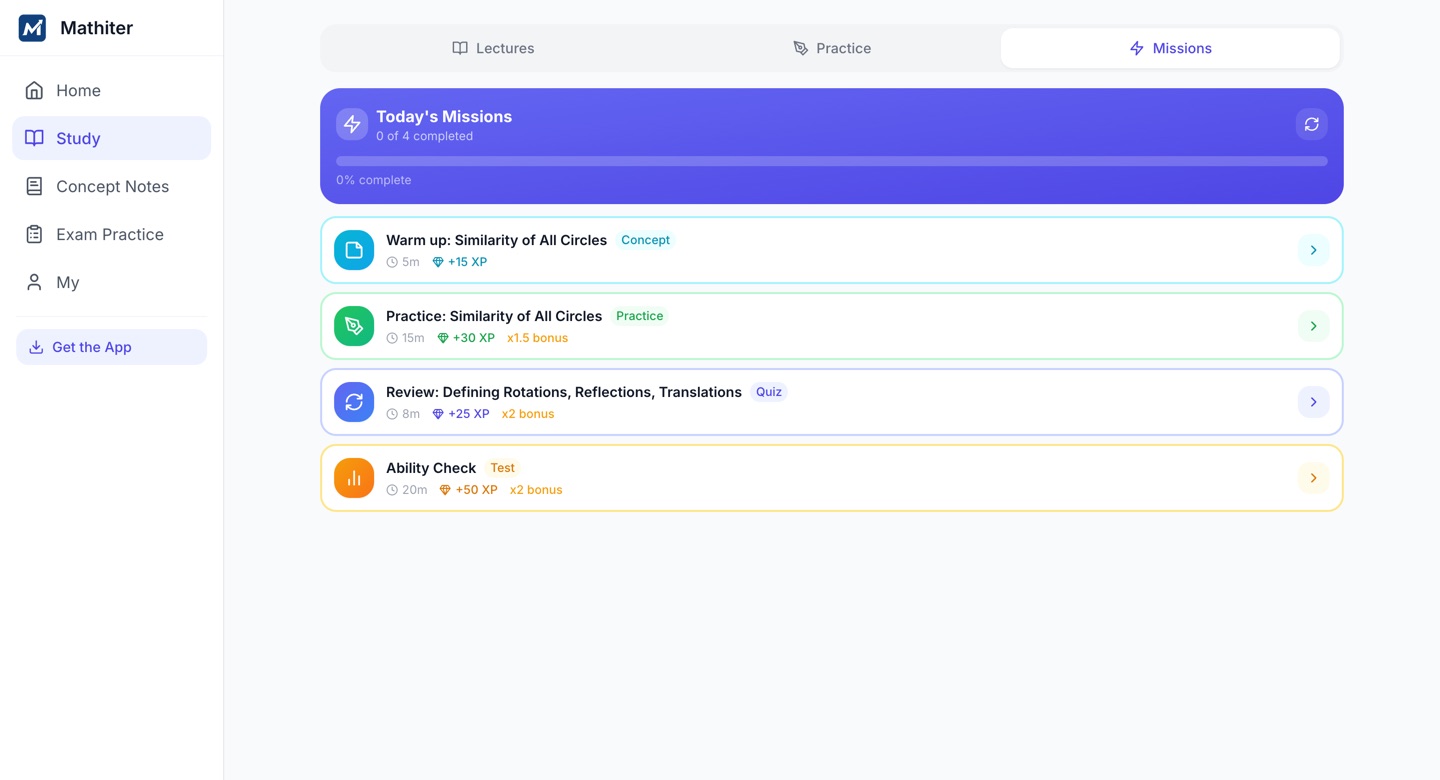
Daily missions
In EnglishA few each day, picked to match what the student has been doing rather than issued identically to everyone.
XP, levels and streaks
In EnglishAttendance and effort accumulate visibly. Worth knowing what this number is not: see the note in the teacher section.
Collection cards, a pet and a room
In EnglishConcepts learned become cards to complete; points earned by studying buy pets, avatars and room items. The pet hatches and evolves, which is a stronger reason to open the app on a Tuesday than a progress bar is.
A leaderboard, friends and an activity feed
In EnglishStudents can add friends, visit each other's rooms, and see a feed of what friends have achieved.
No chat, anywhere
In EnglishThere is no messaging feature in the product at all. Friends connect by request and approval, and what a friend can then do is visit a room and read an activity feed. This is deliberate and it is not on the roadmap.
WHAT A TEACHER SEES
The console, and the sentence you need to read before the list
All of it is built and working. All of it is on a Korean screen today. An English build is in progress in a separate stream and we will not give you a date we cannot hold.
Class averages and per-question accuracy
Korean interfaceAccuracy, problems attempted, streaks and activity across the students assigned to you, and the class's accuracy on each individual question — which is the view that tells you a question was the problem rather than the students.
A list of students needing attention
Korean interfaceEveryone under 60% accuracy, with their accuracy and problem count. It does not tell you the topic: the screen has a slot for one and the server does not send it, so that line renders empty. It is the most useful thing this list could say and it is the thing it does not say.
Per-student ability, strand radar and misconception counts
Korean interfaceFor one student at a time: the ability estimate, a radar across strands, and which misconceptions they are carrying and how often.
An assignment builder
Korean interfaceBuild practice from the curriculum tree and assign it. The tree is hardcoded to the US system — Grade 6 through AP Calculus AB costs you nothing, and IB or Cambridge costs you the builder. The standards and the questions exist for those tracks; the builder cannot walk to them.
A live classroom
Korean interfaceOne teacher and one student in a shared session. It is not a class and calling it one would be a lie of scale.
Two things about the console that a demo would not show you
The dashboard's “average level” is the gamification XP level — how much a student has played — not the ability estimate. They are different numbers measuring different things, and the label does not say which one you are looking at.
Forty-three backend messages still return Korean text, so an English teacher build will not by itself make every error legible. That work is separate and it is not finished.
WHAT IS NOT BUILT
The absences, in the same table rather than in a footnote
Each row says what it means on a Monday rather than what it means on a feature grid.
| Not built | What that costs you |
|---|---|
| Roster import | You add students one at a time by email address. At a year group of eighty-five that is an afternoon — not an IT project, but not an integration either, and we will not call it one. |
| A class or section entity | Nothing in the product is your Period 3. Every report is per student, and there is no class-level report because there is no class object for one to attach to. |
| LTI, Clever, ClassLink, OneRoster, Google Classroom | No grade passback and no roster sync. Mathiter is a link in your course, which is exactly how Khan Academy already lives there. Google sign-in works, so students use the account the school issues — that is sign-in, not an integration. |
| A school-admin console | No administrative view across a school's accounts, no domain restriction, no SSO and no SCIM above individual Google sign-in. |
| Any printable or exportable report | Nothing produces a document you can attach to a report card or hand across a parents' evening. |
| Teacher-authored questions | You cannot add your own items, edit ours, or bring a bank with you. |
| An English teacher interface | In progress in a separate build, roughly half done, with no date. The student learning side is already English; the teacher side is what is waiting. |
| Evidence anyone else has checked | No efficacy study, no ESSA rating, no SOC 2, no ISO 27001, and no school we can name as a reference. You would be the first. |
WHERE IT RUNS
What your IT team has to do to allow this
Close to nothing, which is the point of it being a web app.
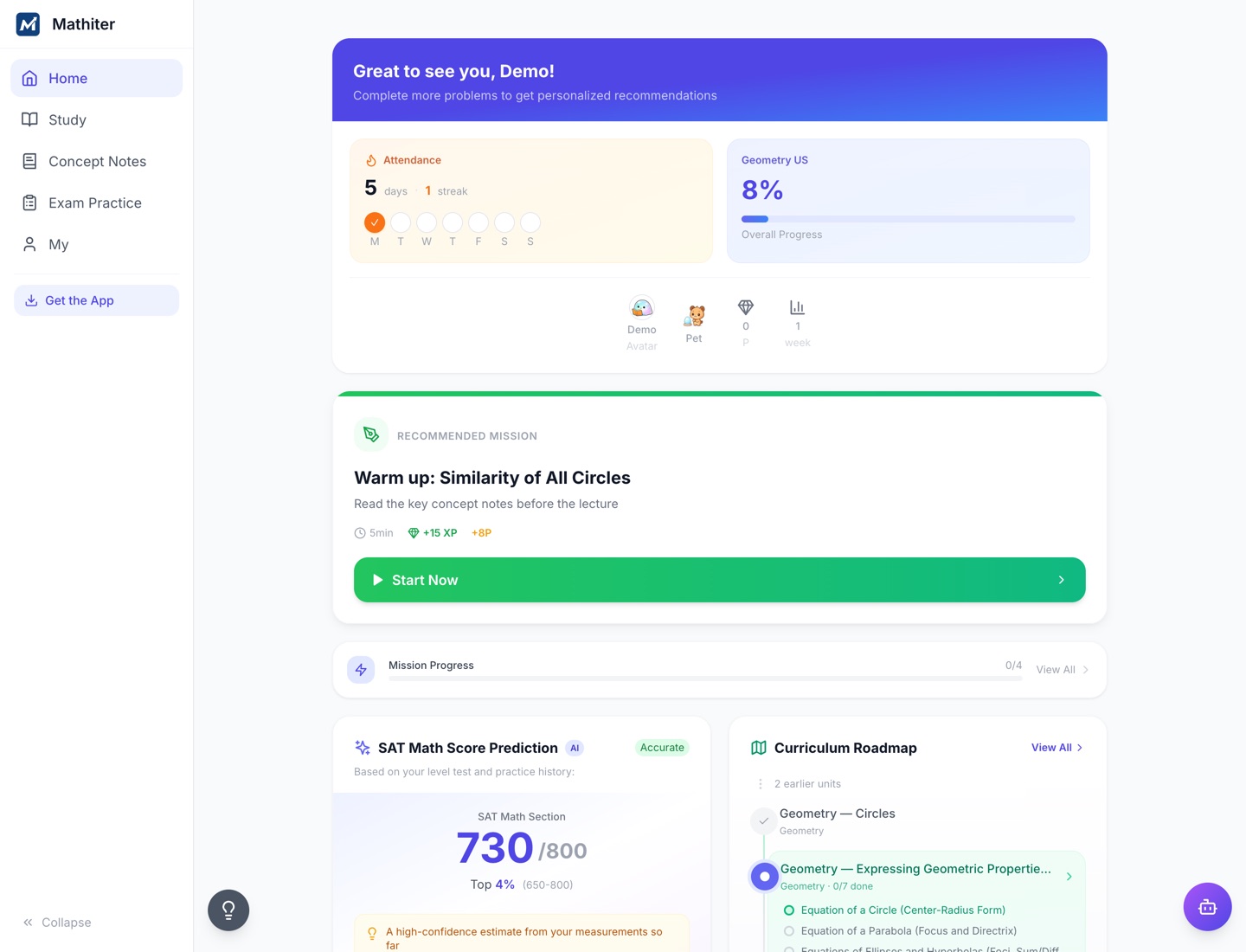
A browser, on whatever the student has
iPad, MacBook or phone. Nothing to install and nothing to push through a device manager; it adds to the home screen and behaves like an app if a student wants that.
The Google account the school already issues
Google sign-in works, as does email and password. There is no domain restriction above it — see the row in the table above.
Five interface languages
English, Korean, Japanese, Chinese and Malay for the student interface, set on the account rather than guessed from the browser. The mathematics is taught in English throughout.
Hosted in Seoul
Google Cloud, asia-northeast3, on Firebase, Cloud Run and Firestore. The sub-processor list, the retention and export answers and the DPA position are all on the data page.
The fastest way to check any of this is to run the free part.
One class, one period. Every student gets an ability estimate with a confidence range and a percentile on their own page — per student, because there is no class object, exactly as the table above says. No card, no contract, nothing installed.
Run a class free →marketing@mathiter.com — first reply within 24 hours on working days.